Fake Claude Installer Malware: What We Found and What to Do
Attackers are distributing fake Claude installers through paid search ads and claude.ai artifact links. Here's what we found, how the campaign works, and how to verify your endpoint coverage.
Learn more

Josh Zweig
July 27, 2026
In this article
Recently, we discovered a new kind of AI-enabled malware, posing as what looked like the official, downloadable Claude desktop app. CrowdStrike caught it, stopped the exfiltration, and flagged something that would have let it hide from Windows Defender permanently. Here's the full breakdown: what happened, how the campaign works, and how to verify your endpoints are covered before this hits your team.
Key Takeaways
- Fake Claude installers: Attackers are distributing malicious Claude installers through paid search ads pointing to legitimate-looking
claude.aiURLs. - CrowdStrike caught what Defender and domain allowlists would have missed: The malware added itself to Windows Defender's exclusion list before Defender could scan it. CrowdStrike's Falcon Complete flagged and remediated it anyway.
- Coverage gaps are the real risk: If any device in your fleet isn't fully enrolled with CrowdStrike prevention policies active, it's exposed. The fix is closing that gap and keeping it closed.
- Check three things right now: Device enrollment, CrowdStrike coverage, and CrowdStrike prevention policy coverage: all three need to be at 100% to mitigate this kind of malware attack.
What We Found: A Real Attack, Stopped Mid-Execution
A sponsored search result for the Claude desktop app points to what appears to be “claude.ai.” When downloaded, it launches what looks like an official installer called “ClaudeDesktop.zip.”
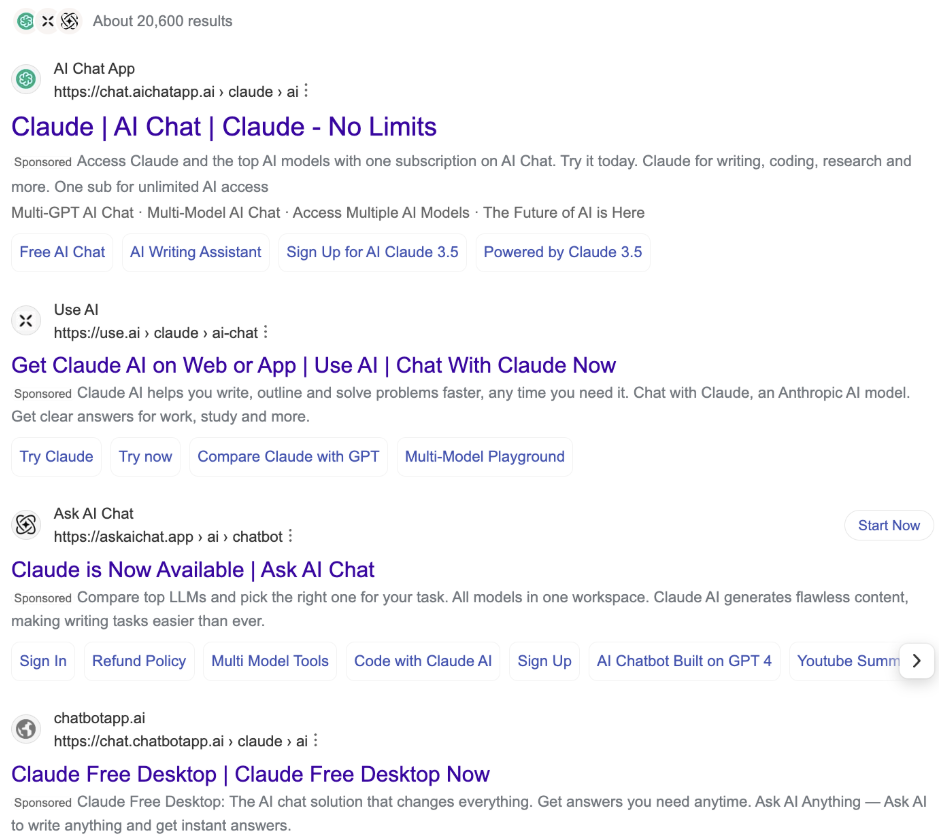
Unfortunately, this is cleverly disguised malware.
The good news is that those with effective endpoint detection and response coverage (like Zip customers) should not fear. When Zip discovered the malware, CrowdStrike's Falcon Complete detected the threat, blocked active exfiltration to an attacker-controlled domain, and flagged something critical: the malware, which was specifically designed to evade Windows Defender, had already written itself to the program’s exclusion list.
Because Zip had fully deployed Falcon Complete, CrowdStrike was able to remediate the threat before it caused any damage. No data was lost.
Before you read on, please know that if your devices are enrolled and CrowdStrike coverage is complete, you're protected. CrowdStrike detects and blocks these fake installers before they can do damage. Zip customers are already protected against this attack.
To see how Zip can get your company protected in 14 days or less, book a demo.
How the Fake Claude Installer Attack Works
This campaign is technically straightforward, which is part of what makes it dangerous.
Here's how it works: Anthropic lets any user publish content to public links under claude.ai/public/artifacts/.... Attackers abuse this feature to host malicious download pages, then promote those links through paid search ads. To an employee, the result looks completely trustworthy: a sponsored search result pointing to the genuine claude.ai website, offering what appears to be an official installer. This is similar to campaigns we’ve seen before, but slightly more sinister - the links appear to actually come from Anthropic’s domain. Anthropic has been informed of this behavior.
If a user runs the fake installer, the malware installs itself on their computer and quietly sends sensitive information (like credentials and company data) to attacker-controlled servers.
Traditional defenses like domain allowlists won't stop this attack — the link really is on claude.ai. And employees can't be blamed for trusting it, because the domain is legitimate. A trusted domain does not mean trusted content. Anything under claude.ai/public/artifacts/ is user-generated and should be treated like a file from any file-sharing site.
Once the fake installer runs, it does two things quickly. It begins exfiltrating credentials and company data to an external server. And it registers itself as a Windows Defender exclusion, so Defender stops looking at it. On a device without CrowdStrike, that combination would likely go undetected indefinitely.
What to Expect From This Campaign
This campaign shares structure with broader AI-themed malware distribution that's been documented through 2025. It’s not surprising—the attack itself is an evolution of attacks we’ve seen previously, which use convincing paid ads to front-load false downloads in search results for legitimate tools. The difference is that this attack specifically exploits that Anthropic’s claude.ai domain can currently host arbitrary user-generated content.
Expect this to evolve. As Anthropic closes the specific artifact pages containing malware, attackers will publish new ones. The infrastructure rotates; the technique stays the same.
What else can you do to prevent the new malware attack?
1. Only download Claude from Anthropic's official page
Claude's official desktop app is available exclusively from Anthropic's official download page, never from an artifact link or search ad. Share this with your team so that there’s a standardized way to download the desktop app, and no one accidentally downloads malware through a search.
2. Verify your device coverage is complete
Double check that all your devices are enrolled in your MDM provider, that CrowdStrike is deployed across all devices, and that each of your devices has CrowdStrike prevention policy coverage. This way, every endpoint in your fleet is protected. If you’re secured by an MSP or external contractor, contact them and ask them to give you a rundown of where your coverage has gaps, as well as their plan to remedy that gap.
3. Understand your team’s Claude usage
If you don’t have visibility into what AI tools your team is using, it can be difficult to understand which AI products have access to your sensitive data. Zip has released an AI visibility feature that allows you to better understand your organization’s use of AI tools, including Claude and Anthropic products.
Interested in Zip’s AI visibility tools? Book a demo today to see what greater insight into your team’s AI use could do for your security posture.
4. Consider managed detection and response (MDR)
If manually triaging alerts isn't realistic for your team, you might want to consider adding an MDR service to handle that work for you. Read more about what differentiates MDR and EDR here.
Need an MDR solution quickly? With Zip, your team can get protected in less than 14 days. Book a demo to learn more.
If You're Not Running Managed Detection and Response
Falcon Complete caught this threat because someone was watching the alerts and had the authority to act on them. That's the managed detection and response (MDR) layer.
If your team is triaging CrowdStrike alerts manually — or not triaging them at all because there's no dedicated security person — you have CrowdStrike's prevention capabilities but not the response layer that turned a potential breach into a non-event for this customer. Zip's managed security operations handle alert triage, investigation, and remediation so your IT team gets a notification when something is resolved, not a queue of open alerts to work through.
For a lean IT team or a company with no dedicated security staff, the gap between managed response and manual triage is the gap between catching a threat in minutes and finding out three weeks later.
Want to see what Zip could do for your security posture? Book a demo to get started.
In this article
Get started with Zip
Learn more about Zip's MDM, EDR, IT, and Compliance solutions and we'll find the right fit for you.
Related articles
What Your Security Questionnaire Really Says About Your Business
August 27, 2026
EDR vs. Antivirus: Understanding the Difference and Choosing the Right Approach
July 24, 2026
SaaS Security Questionnaire: The Controls Enterprises Expect
July 24, 2026
Learn more
Questions about this article? Get in touch with our team below.