Real or Fake App Download? How a New Hire's Google Search Led to a Malvertising Ad
Can one Google ad put your business at risk? See the fake app download a new hire clicked on day one and how Zip stopped the malware in time.
Learn more

Josh Zweig
November 11, 2026
In this article
Most of us install productivity software the same way: search for it, click the top result, and download.
On a new hire's first morning, that's exactly how they went looking for the desktop version of a popular work app.
The top result was a sponsored ad. It used the app's own messaging and led to a page that looked just like the official download page, at a URL only a character off from the real one. They clicked, downloaded the installer, and opened it.
Normally, that click is where the trouble starts. Thankfully for this company, Zip had already deployed CrowdStrike on every device.
Zip's endpoint detection and response flagged the fake installer the moment it ran and took the new hire's laptop offline to resolve the threat, so no data left and no work time was lost. A few minutes later, the new hire installed the real app from the official download page.
What happened here is malvertising: a malicious ad that copies a real brand to lead people to a fake site or download.
What did the fake ad look like and why did it almost work?
The fake ad almost worked because it appeared above the real result, borrowed the app's name and messaging, and linked to a download page that matched the real one closely enough to pass a quick look. During a busy first morning of onboarding, nothing about it immediately stood out.
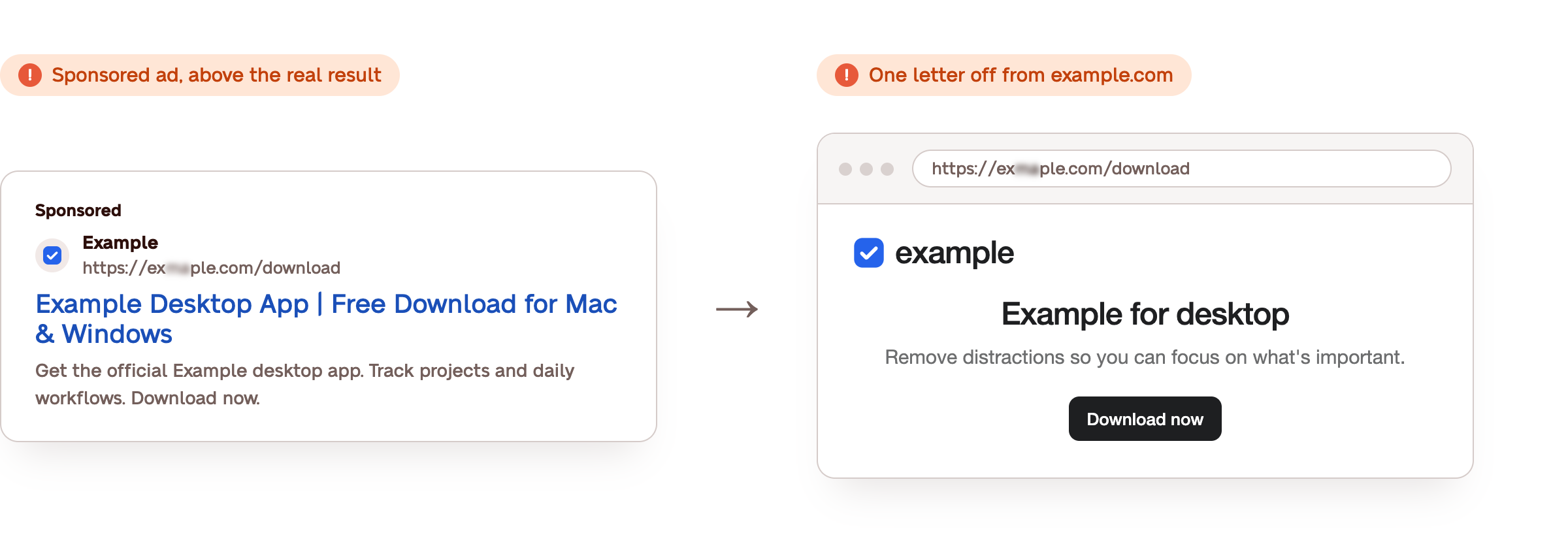
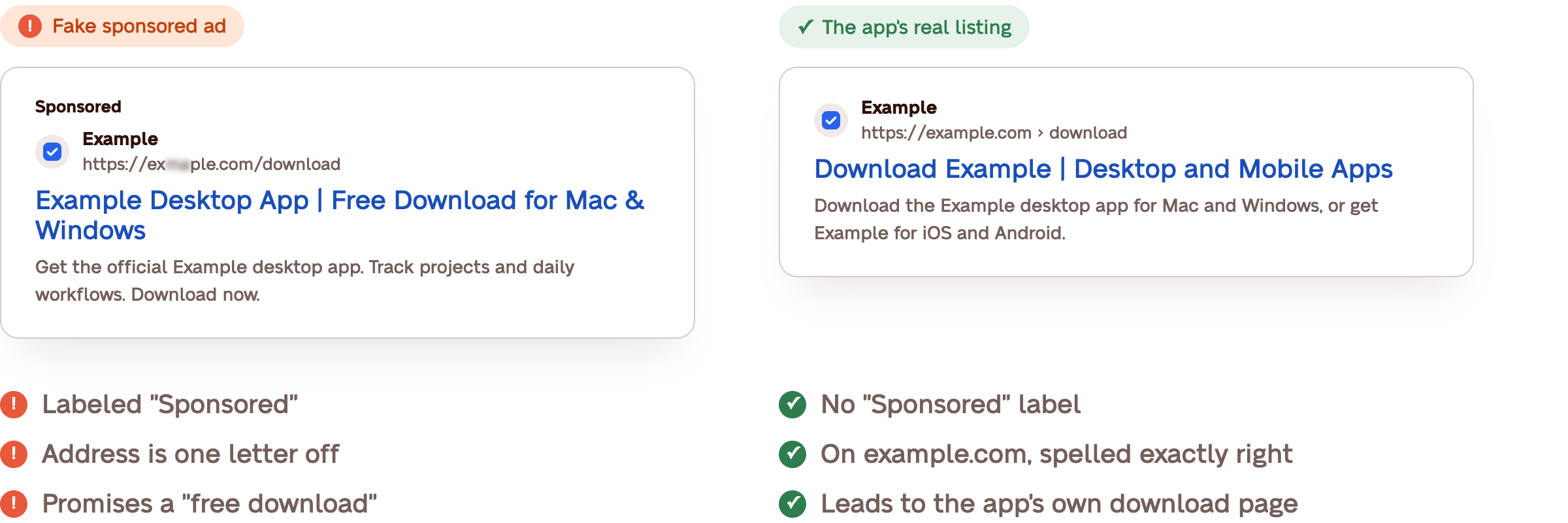
Here's what made each part so convincing:
It sat above the company's own listing. Sponsored ads appear above regular search results, so the fake ad was the first thing on the page. Google labels them "Sponsored," but they look almost the same as everything below, and most people assume an ad at the top of Google has been checked. This particular ad ran from a real advertiser account someone had hacked, which is how it got past Google's review.
The page and URL looked right. The landing page had the app's logo, colors and wording, and its URL differed from the real domain by one swapped letter. It's the kind of detail that's easy to miss when it's an app your whole team already uses.
The download seemed like a normal installer. It had the right name and icon, so there was no reason to hesitate before opening it. A fake software download looks exactly like the real one until it runs.
How did managed EDR catch the fake download before anything happened?
Zip's managed EDR caught it the moment it was opened. Zip had deployed CrowdStrike on every company device before the new hire's first day, which spotted the installer and took the laptop offline. The new hire didn't expose any sensitive company data, and installed the real app a few minutes later.

Real-time detection. As soon as the new hire opened the installer, Zip's endpoint detection and response, powered by CrowdStrike, flagged that it was trying to run hidden in the background.
Offline in seconds, back to work in minutes. Zip took the laptop offline in just a few clicks, so there was no need to track it down or walk the new hire through any steps. Within minutes, the new hire was able to download the real app from the official download page and went back to onboarding.
The team didn't have to drop everything. With Zip's managed EDR, security experts review and resolve alerts 24/7. The company got a notification that something had been handled for them already, not an open alert to add onto a busy first day.
What it could have cost. If the fake installer had kept running, it could have collected logins to the company's tools or sent company data to an outside server, turning one employee's search into a reportable incident with customers to notify. Because nothing left the laptop, it stayed well under that threshold. There was no one to notify and the first day carried on.
What is malvertising?
Malvertising, short for malicious advertising, is a paid ad that copies a real brand to send people to a fake site or fake software download. It runs on the same ad platforms real companies use, like Google Ads, so it shows up in the same places and looks just as trustworthy.
How does malvertising work?
It's bought like any other ad. Google reviews ads before they run, but some slip through, especially when they come from a real advertiser account that's been hacked, like the one in this story.
It copies the tools people search for most. Work apps like Slack and Zoom, project management tools and AI tools like Claude and ChatGPT are common disguises because people search for them by name and expect to download them. A new hire setting up a laptop is exactly the person typing those searches.
It ends with a download. Most malvertising isn't after the click itself. It's after the software you install next, which is often malware built to collect logins or export company data.
This fake ad isn't the first malvertising example we've seen. Another one of Zip's customers had an employee click a malicious ad and download data-stealing malware, and it was caught the same way.
How do you tell if a download is safe?
A download is safe when it comes straight from the company that makes the app. In this story, that meant the app maker's own download page instead of a sponsored search result. Check these five things before installing anything:
1. Go straight to the official site. Type the app's official address into your browser or save it as a bookmark. Most apps keep it on their own domain, often at /download, where you pick Mac or Windows without ever seeing a sponsored result.
2. Skip "Sponsored" results. If you do search for an app, scroll past anything labeled "Sponsored" and click the company's own listing. That's where fakes like the one in this story tend to show up.
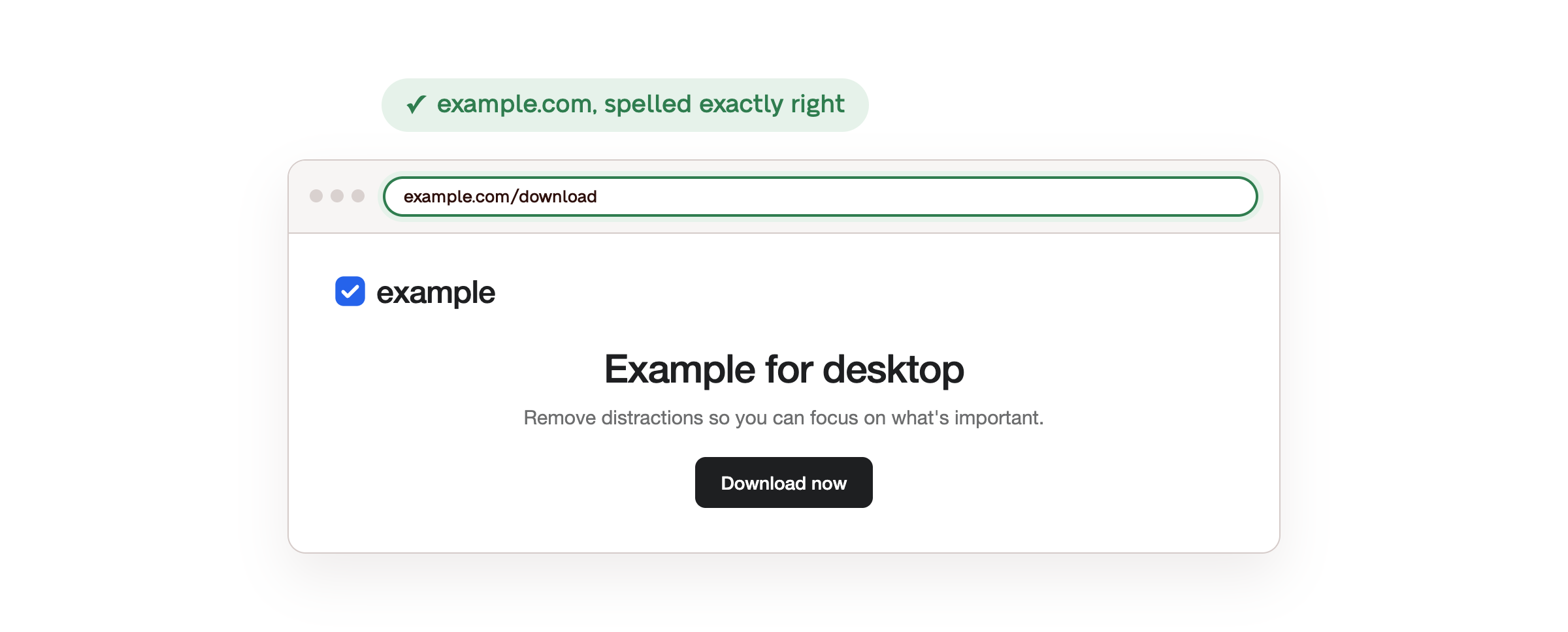
3. Check the address before you download. The real page should be on the company's own domain, spelled exactly right. One swapped letter, an extra word, or a different ending like .net or .app means it's not the real site.
4. Confirm the publisher. On a Mac, installers are usually .dmg files and on Windows they're usually .exe files. If your computer asks for permission to install, the publisher should be the company that makes the app. Anything else is a reason to stop and ask.
5. Use the browser version if you're unsure. Many work apps, including most project management tools, work fully in the browser so you may not need to download anything.
How can growing teams protect themselves from fake software downloads?
EDR for small businesses works the same way it does for large ones. It watches what files do once they run, so a convincing fake still gets caught.
Growing teams can protect themselves from fake software downloads the same way this company did: every laptop secured before day one. With endpoint detection and response running and security experts reviewing alerts around the clock, a fake installer gets caught the moment it runs, before it can do any harm.

The new hire in this story searched for an app like most of us would, and that turned out to be fine. Their laptop already had CrowdStrike deployed to catch the fake installer and Zip's security team to handle the alert. No data left, no customers needed a notice, and they spent their first morning getting set up instead of explaining what happened.
For a team without an IT or security person in place, that response layer is what separates a fake download caught on day one from an incident nobody notices until the damage is done.
Get automatically protected in 14 days
FAQs
Is it safe to download apps you find on Google?
Desktop apps from the company's own website and mobile apps from the App Store or Google Play are usually safe. The risk comes from fake copies promoted through ads, so type the address yourself instead of searching for it.
Would antivirus have caught the fake download?
Probably not. Traditional antivirus mainly checks files against known malware and a new fake installer may not be on that list yet. This one also looked like the app's real installer.
CrowdStrike caught it by watching what the file did, like trying to run hidden in the background. That's the main difference between antivirus and Zip's endpoint detection and response.
Is malvertising the same as phishing?
They're close, but they reach you differently. Phishing comes to you through an email, text or message that pretends to be someone you trust. Malvertising waits for you in search results and ads, so you find it while looking for something real.
Both borrow a trusted name to get one quick click or download.
What is SEO poisoning?
SEO poisoning is when a fake site is pushed high in regular search results using search engine tricks, instead of paying for an ad. The result is the same as malvertising: a page that looks like a real brand's and offers a fake download.
The difference is that it doesn't carry a "Sponsored" label, so skipping ads alone won't avoid it.
Does Google remove malicious ads?
Yes. Google reviews ads before they run and removes ones that break its policies, but some get through, especially when they come from a real advertiser account that's been hacked.
If you see a fake ad, use the menu next to the "Sponsored" label to report it.
Do ad blockers stop malvertising?
Ad blockers can hide many search and display ads, including some malicious ones, but they're not a complete fix. They don't catch SEO poisoning or links sent by email, and many company laptops limit which browser extensions people can install.
That's why protection on the laptop itself matters. Zip's endpoint detection and response, powered by CrowdStrike, catches a fake download no matter how it got there, whether from an ad, a search result or an email.
What should you do if you clicked on a fake ad?
If you only clicked and didn't download anything or type in a password: Close the page. The risk is often low, but it's still worth telling your security team.
If you did download something: Don't open it again. Disconnect from Wi-Fi and report it right away. On Zip-secured laptops, the device can be isolated in just a few clicks.
In this article
Related articles
Real or Fake Claude Installer? How to Protect Against Claude Artifact Malware
November 11, 2026
What Is Typosquatting? How Lookalike Domains Send Fake Invoices
November 11, 2026
Common Types of Security Incidents New Hires Run Into: 3 Real Examples
November 10, 2026
Learn more
Questions about this article? Get in touch with our team below.